This should download the software to your computer and using STUFFIT
EXPANDER expanded it to be executable.
IF YOU CHOSE TO DOWNLOAD 5PM SUITE READ HERE!
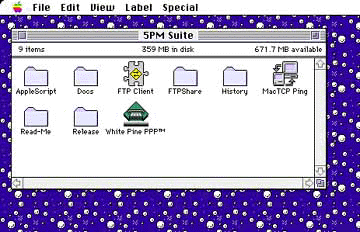
By now you should have 5PM SUITE somewhere on your computer (probably
on the desktop).
Click on the directory FTP CLIENT then click on DEMO
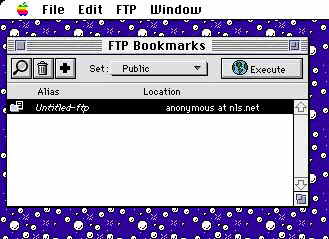
This should open a window called FTP BOOKMARKS, click on the PLUS
SIGN i.e. (+)
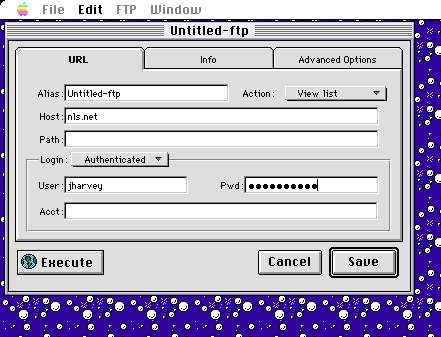
1) This should open a window called UNTITLED-FTP
2) In the host box type: nls.net
3) Click on ANONYMOUS box and change to AUTHENTICATED.
4) Fill in your user ID. and your PASSWORD then click
EXECUTE.
5) Choose to save it if you want.
Now you are successfully into your web space. To upload documents into your
space simply drag the documents into the window or to download documents
to your machine simply double click on the document in the window and choose
where to save the information to on your computer. To view your hard work simply
type http://www.nls.net/mp/(and your directory name) into the location box of
your web browser.
NOTE:
The first page of your site needs to be named default.htmlIF YOU DOWNLOADED FETCH 3.0.1 READ HERE
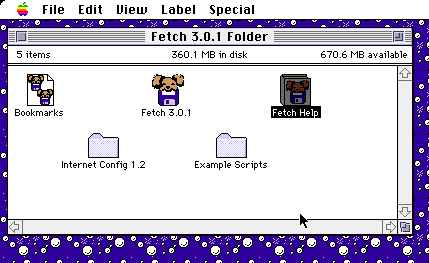
By now you should have FETCH 3.0.1 somewhere on your computer (probably
your desktop).
Double click of the folder Fetch 3.0.1
Next click on the icon FETCH 3.0.1
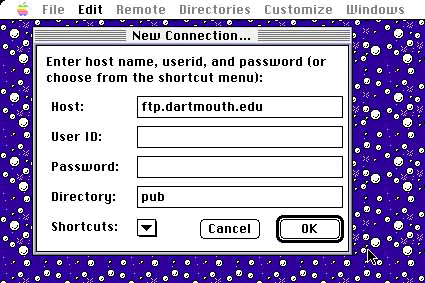
Then choose the pull down menu File then choose New Connection
In the Host area type in FTP.NLS.NET
Insert your userid and password where it says userid
and password
Erase anything in the DIRECTORY area
Once you've finished the above hit ENTER. This should show you
your directory (which is probably blank since this is the first time you've
accessed it). From here you can upload your HTML code by choosing REMOTE
from the drop down menu and then clicking on PUT FOLDERS AND FILES.
From here you merely need to choose the directory and highlight the appropriate
file you wish to upload and then hit enter. To download a file
from your directory merely double click on the file and it will automatically
download it to your machine. To view what you have created from the world wide web
simply type http://www.nls.net/mp/(and your directory name) into the location box of
your web browser.
NOTE:
The first page of your site needs to be named default.html