
Down at the bottom in the "Dock" you will find an icon that has an apple on it. This is the System Preferences. Click it once and a window will pop up displaying all the controls of the computer (much like the control panel in Windows.)
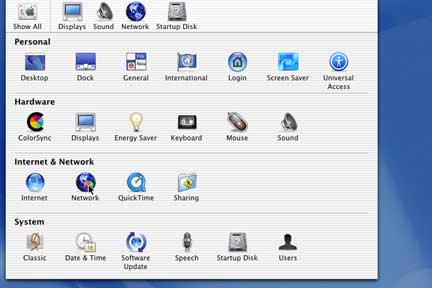
Locate the icon that says Network under Internet & Network and click it one time. This will bring up the Network Control Panel.
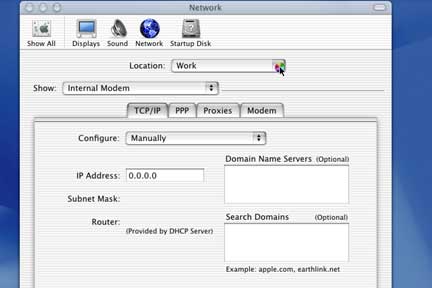
Under Location at the top, click the dropdown menu and choose new location. You can have multiple locations each with its own configuration.
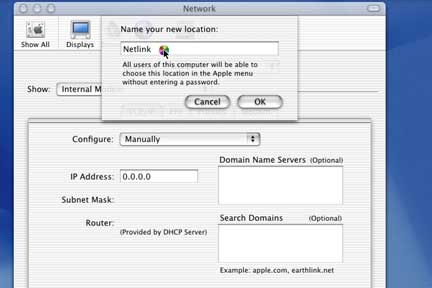
Name the location Netlink and click OK.
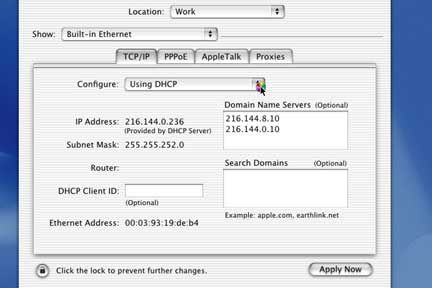
Where it says Show, make sure you have Built-in Ethernet Selected.
Under Configure check the appropriate box.
Put in any necessary information depending on how the network is setup.
Domain name servers should be 216.144.8.10 and 216.144.4.10
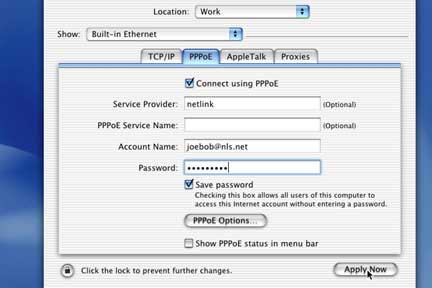
Click on the PPPoE tab at the top.
Fill in all the appropriate information.
Make sure to hit Apply Now.